
INTELLIKID SYSTEMS
New Releases
The latest product updates, improvements, and new features.
LMS
Know who’s closing out every tour in the system
Shared by the Product Team | October 2026

The Schedulers Data and Scheduled Tours List reports now include a new Status Changed By column, showing who completed, canceled, or marked each tour as a no-show.
Greater visibility into how tours are managed. See which team members are closing out the most tours and how that work is shared across your center.
Understand why tours fall through. Tell at a glance whether a cancellation came from your team, the family, or an automation, so you can spot patterns and keep your tour process running smoothly.
LMS
Self-Scheduled Tours Report
Shared by the Product Team | September 2026

The Self-Scheduled Tours Report gives you a complete view of every tour booked for your center within a chosen date range. It covers tours families scheduled themselves online as well as tours set up manually by staff.
Self-scheduling adoption at a glance. Compare how many tours families are booking themselves versus how many are scheduled by staff. Check in weekly to see whether more families are booking on their own and whether your self-scheduling tools are saving your team time.
Connect tours back to marketing spend. Every tour includes full lead source and UTM attribution, so you can see which campaigns, referrals, and website pages are driving booked tours, not just leads.
Give staff credit — and accountability. “Scheduled By” shows which staff member booked each manually scheduled tour, so you can recognize proactive follow-up and coach where it's needed.
Filter by date range, location, or tour status to find exactly what you need, and click into any number to drill into the underlying tour list.
LMS, Call Ai
Pin the transcription sidebar while you work
Shared by the Product Team | May 2026
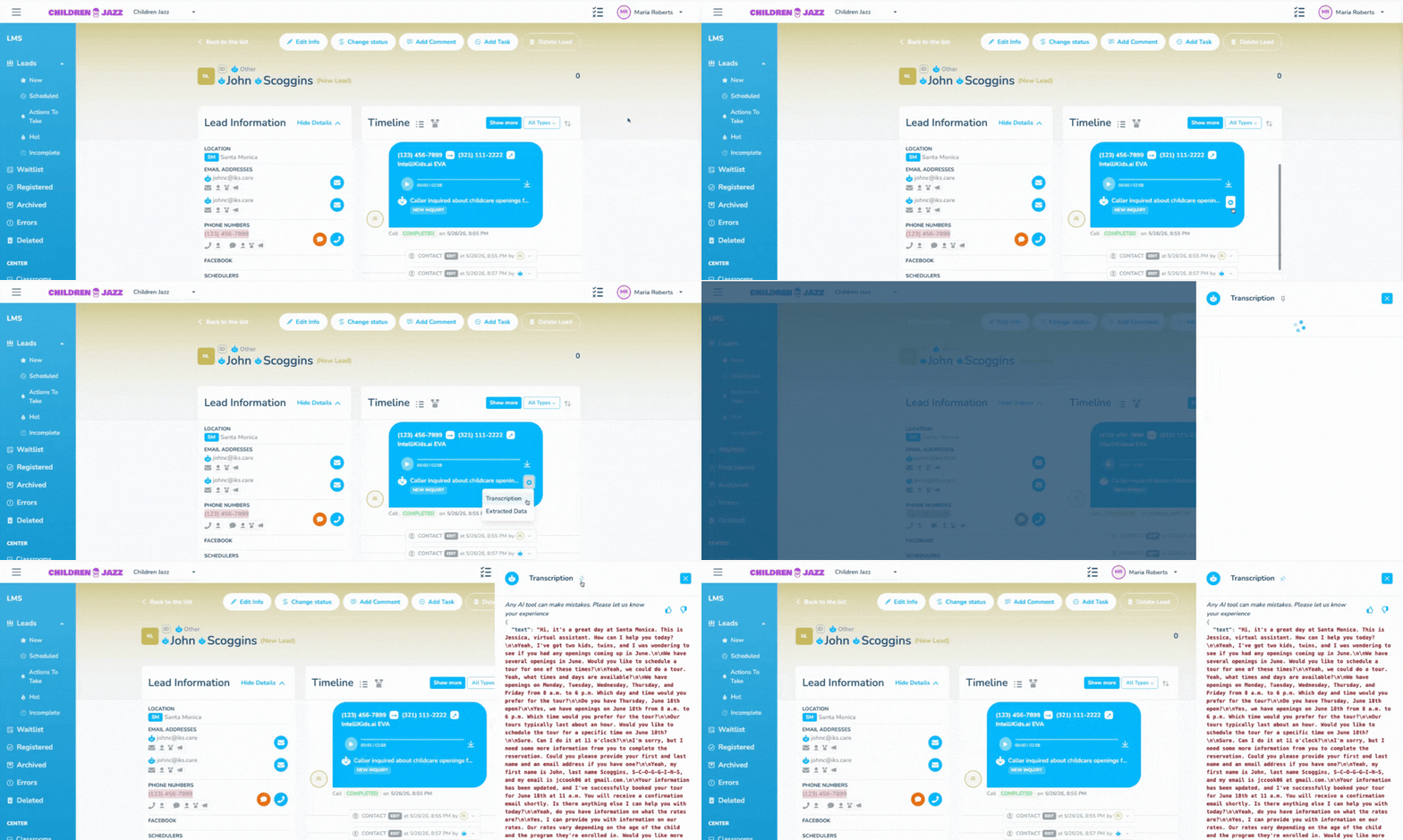
The AI transcription sidebar can now be pinned so it stays open while you interact with the rest of the platform.
Click the Pin icon to dock the sidebar to the side of your screen. From there, you can open other modals like Edit Lead without the transcription closing or blocking your work.
On screens narrower than 1400px, the sidebar automatically moves to the bottom of the screen instead, so it stays accessible without getting in the way.
IntelliForms
IntelliForms Payments Upgrade
Shared by the Product Team | April 2026

IntelliForms keeps getting smarter, and these latest updates mean less friction for families and less follow-up for your team.
Payments and submissions on autopilot. Parents now have real-time visibility into where their submission stands, and once everything is confirmed, the process moves forward automatically. If a payment doesn't go through, parents are notified and can resolve it on their own without contacting your office.
Promo codes. Scholarship families, staff enrollments, voucher programs. Eligible families can now move through the process without payment, and every action is logged so your team always knows what happened, who did it, and when.
Admin field override. Administrators with the appropriate permissions can now override required fields to help families cross the finish line in specific cases, with full transparency and a complete audit trail.
Updated status indicators. Your team can now see exactly where every lead stands at a glance. Updated visual indicators across your fillout list make it easy to understand the status of every document and package without digging for answers.
New automation triggers. Two new Lead Package statuses are now available in automations, so you can automatically send follow-up messages when a payment fails or update a lead record the moment a promo code is used.
LMS
Take full control of how your webforms look
Shared by the Product Team | April 2026
Web Forms now have two editor modes: Simple and Advanced. Simple mode covers everything you need to build and launch a form quickly. Advanced mode unlocks a deeper set of styling controls so your forms can match your brand exactly.
To get started, toggle on Advanced Mode to reveal the Theme Tab in the right-hand settings panel. The Theme Tab organizes controls into style groups, each covering a different aspect of your form's appearance. Within each group, you can adjust individual variables independently, including heading colors, button colors, and additional styling options. For any color variable, you can choose from your existing theme palette or set a custom value.
You can switch between Simple and Advanced mode at any time without affecting your form content.
IntelliForms
Reconcile multi-item transactions with one report
Shared by the Product Team | March 2026
If your center collects payments that include multiple line items, like a registration fee, deposit, and supply cost in a single transaction, the new Line Item Sales Report is built for you.
Each row in this report represents one line item from one transaction. For every item sold you can see:
Title, quantity, price, and total: a full breakdown of each line item in the transaction.
Direct link to the original transaction: jump straight to the source for quick verification.
Filter by payment date: makes end-of-month reconciliation straightforward and efficient.
If you mostly collect single-item payments, the standard Transaction Details report still covers your needs. The Line Item Sales Report is specifically useful when your invoices regularly include multiple products or services.
IntelliForms
See Every Dollar, Every Payout, Every Refund. All in One Place.
Shared by the Product Team | March 2026
Your families have a seamless experience registering and paying through IntelliForms. Now your back-office team gets one too. Four new financial reports bring complete visibility into every payment, payout, and refund.
Payments Received. A clean overview of all incoming payments by lead, organized by transaction date. The fastest way to confirm a payment came through or spot a failed transaction that needs follow-up.
Transactions (Detailed). Every payment received, every payout, and every refund in one unified view. Each row is one transaction, with fees, net amounts, and payout linkage included. Built for reconciliation, auditing, and tracing any payment end to end. A chart view is also available for visual summaries by location or month.
Payouts. A payout-level summary showing how much was disbursed in each cycle, including transaction totals, fees, and refunds. If your expected and actual disbursements ever don't match, this is where you start.
Refunds and Returns. Every refunded or returned transaction organized by refund date, with the original transaction ID attached. Covers both pre-payout and post-payout refund scenarios so nothing gets lost in the accounting.